~/blog/stateless-infrastructure-scaling-applications.md
Stateless infrastructure: the foundation for scaling applications painlessly
Why designing applications without server-side state is key to scaling horizontally, deploying without downtime and recovering from failures, and how to do it right without falling into common mistakes.
- author
- Alejandro Peñaloza
- Published
- Reading
- 7 min
- Español
- Leer en español →
In this article
Sooner or later every growing application hits the same wall: a single server is no longer enough. You add a second instance behind a load balancer and, suddenly, users lose their sessions, uploaded files "disappear" and scheduled jobs run twice.
The problem is almost never the number of servers. It is the state each server keeps on its own. In this article I explain what stateless infrastructure means, why it is the foundation of modern scaling and how to put it into practice without falling into the typical mistakes.
What does "stateless" mean?
An application is stateless when any instance can serve any request, because none of them keeps local information that the next request needs.
That does not mean the application has no state. It means the state lives outside the process: in a database, in a distributed cache, in object storage or in the client itself (for example, a signed token).
| Type of state | Stateful (on the instance) | Stateless (externalized) |
|---|---|---|
| User sessions | Local memory or disk | Redis, database or JWT |
| Uploaded files | Local folder on the server | Object storage (S3 or compatible) |
| Cache | Process memory | Distributed cache (Redis, Memcached) |
| Background tasks | Cron on every server | Message queue + workers |
| Configuration | Hand-edited files | Environment variables and secrets manager |
| Logs | Files on disk | Standard output shipped to an aggregator |
The problem: scaling a stateful application
Imagine an application that stores the user's session in the server's memory. With a single instance it works perfectly. With two, the load balancer spreads requests and the user bounces between servers that know nothing about each other.
sequenceDiagram
    participant U as User
    participant LB as Load balancer
    participant A as Instance A
    participant B as Instance B
    U->>LB: POST /login
    LB->>A: Forwards request
    A-->>U: OK, session stored in A's memory
    U->>LB: GET /my-account
    LB->>B: Forwards request
    B-->>U: 401 Unauthenticated
    Note over B: B does not know the session created on A
The "quick" fix is usually to enable sticky sessions, that is, having the load balancer always send the same user to the same instance. It works, but it is a patch:
- Load is distributed unevenly.
- If the instance goes down, all its users lose their session.
- Scaling down (shutting instances off) cuts active sessions.
- Deployments become delicate because every instance "matters".
The stateless architecture
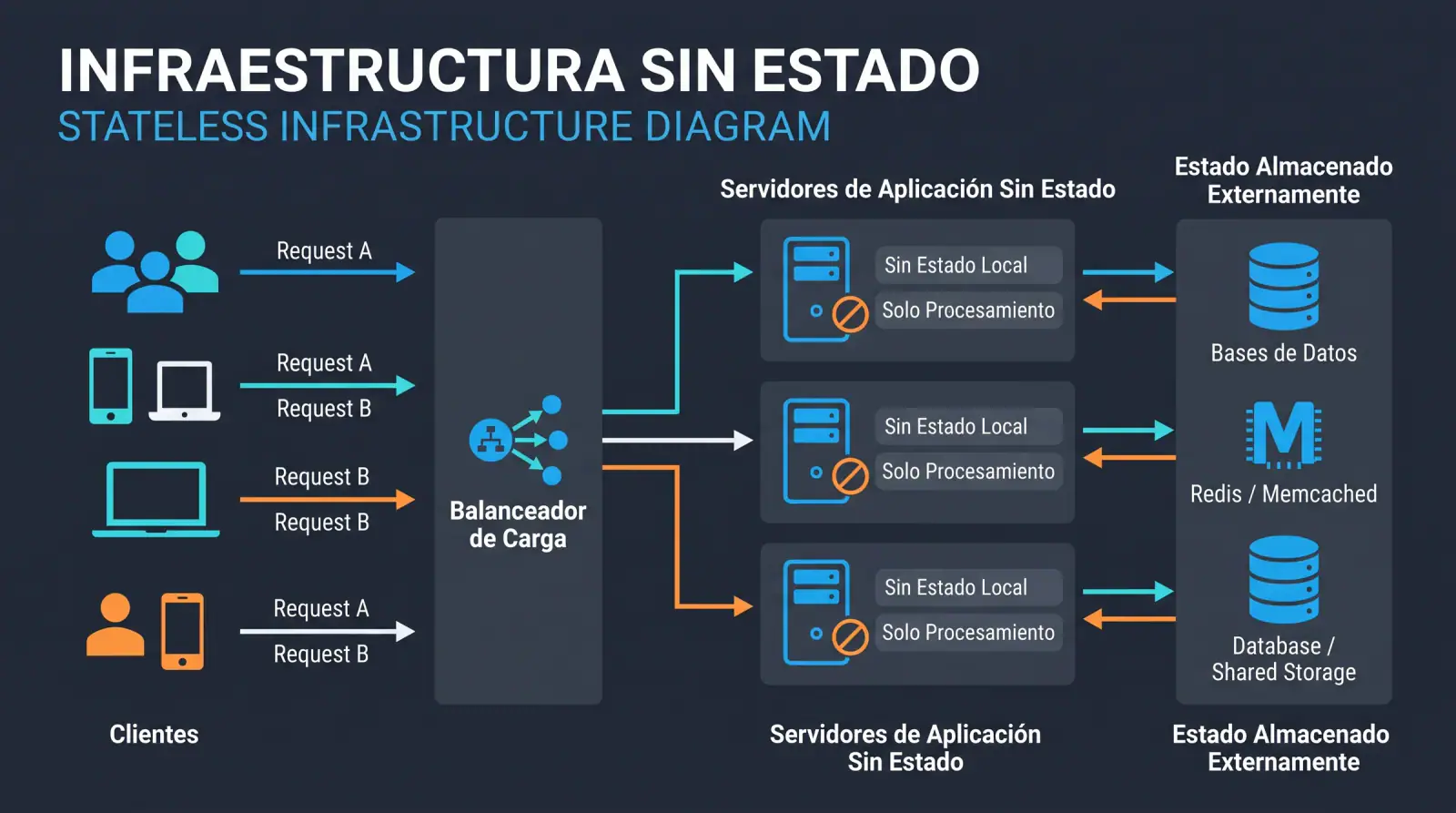
In a stateless design, application instances are interchangeable and disposable. Everything that must persist moves out to specialized services.
flowchart TB
    U["Users"] --> LB["Load balancer"]
    LB --> A1["App instance 1"]
    LB --> A2["App instance 2"]
    LB --> A3["App instance N"]

    subgraph State["Shared state layer"]
        DB[("Database")]
        R[("Cache / sessions")]
        S3[("Object storage")]
        Q[["Message queue"]]
    end

    A1 --> DB
    A2 --> DB
    A3 --> DB
    A1 --> R
    A2 --> R
    A3 --> R
    A1 --> S3
    A2 --> S3
    A3 --> S3
    A1 --> Q
    A2 --> Q
    A3 --> Q
    Q --> W["Background workers"]
    W --> DB
The key idea: the application layer scales horizontally without coordination, while the state layer scales with tools built for that purpose (read replicas, cache clusters, managed storage).
Why it matters: the real benefits
1. Immediate horizontal scaling
If any instance can serve any request, adding capacity is as simple as spinning up more replicas. This enables autoscaling: the orchestrator creates or destroys instances based on CPU, memory, latency or queue length.
flowchart LR
    M["Metrics: CPU, latency, requests/s"] --> AS{"Above the threshold?"}
    AS -- Yes --> UP["Add replicas"]
    AS -- No, low load --> DOWN["Remove replicas"]
    AS -- Within range --> KEEP["Keep"]
    UP --> M
    DOWN --> M
    KEEP --> M
2. Resilience to failures
When an instance dies, nothing important is lost. The load balancer stops sending it traffic and the orchestrator replaces it. In the worst case, the user retries a request.
3. Zero-downtime deployments
With disposable instances you can do rolling updates or blue/green deployments: you bring up instances running the new version, verify they are healthy and retire the old ones, with no maintenance window.
flowchart LR
    subgraph Before
        V1a["v1"]
        V1b["v1"]
        V1c["v1"]
    end
    subgraph During
        V2a["v2"]
        V1d["v1"]
        V1e["v1"]
    end
    subgraph After["After"]
        V2b["v2"]
        V2c["v2"]
        V2d["v2"]
    end
    Before --> During --> After
4. More efficient costs
Paying for fixed capacity sized for the peak is expensive. With stateless instances you can scale down during off-peak hours without fear of cutting sessions, and take advantage of cheaper instances (such as spot or preemptible) because losing one is no big deal.
5. Reproducible environments
If the instance has nothing special about it, it can be fully described as code: a container image plus environment variables. That makes development, testing and production look much more alike.
How to put it into practice
Sessions outside the process
There are two main approaches:
- Session in a shared store (Redis or a database): the server keeps only an identifier in a cookie. It lets you invalidate sessions instantly.
- Signed tokens (for example, JWT): the state travels in the token. No store is required, but revocation is harder, so short expirations and refresh tokens are a good idea.
In many frameworks the change is just configuration. For example, in Laravel:
SESSION_DRIVER=redis
CACHE_STORE=redis
QUEUE_CONNECTION=redis
FILESYSTEM_DISK=s3
Files in object storage
No more saving uploads to /var/www/uploads. Files go to object storage and the application only stores the reference. For large files it is worth using presigned URLs, so the client uploads directly to storage without going through the application.
sequenceDiagram
    participant C as Client
    participant API as Stateless API
    participant S as Object storage
    C->>API: Requests to upload a file
    API-->>C: Presigned URL with expiration
    C->>S: PUT file directly
    S-->>C: 200 OK
    C->>API: Confirms upload with the object key
    API->>API: Stores the reference in the database
Background tasks with queues
A cron configured on every server runs N times if there are N instances. The alternative:
- Requests enqueue jobs in a message queue.
- A separate pool of workers consumes them, and it also scales independently.
- Scheduled tasks are triggered from a single scheduler or use a distributed lock to guarantee a single execution.
Configuration and secrets
Following the principle of The Twelve-Factor App, configuration comes in through environment variables and secrets from a dedicated manager. The same container image should be able to run in any environment by changing only its configuration.
Logs as an event stream
The application writes to standard output and the platform takes care of collecting and centralizing it. If logs live on the disk of an ephemeral instance, they are lost along with it.
Health checks
Each instance must expose endpoints that the orchestrator and the load balancer can query:
// Liveness: is the process alive?
app.get('/healthz', (_req, res) => res.status(200).send('ok'));

// Readiness: can it serve traffic? (depends on its external services)
app.get('/readyz', async (_req, res) => {
  const dbOk = await db.ping().catch(() => false);
  const cacheOk = await redis.ping().then(() => true).catch(() => false);
  res.status(dbOk && cacheOk ? 200 : 503).json({ db: dbOk, cache: cacheOk });
});
Graceful shutdown
When the orchestrator retires an instance, it sends a signal (SIGTERM). The application must stop accepting new requests, finish the ones in flight and close connections before exiting.
process.on('SIGTERM', async () => {
  server.close();          // stop accepting new connections
  await queue.pause();     // stop picking up jobs
  await db.disconnect();   // close resources cleanly
  process.exit(0);
});
Doing it right: common mistakes to avoid
Going stateless is not just moving sessions to Redis. These are the most frequent stumbling blocks:
- Moving the bottleneck to the database. If you scale the app to 20 replicas, each one opens its own connection pool. Use a connection pooler (such as PgBouncer for PostgreSQL), read replicas and caching so you don't saturate the database.
- Hidden local cache. Static variables, singletons holding data or in-memory caches create inconsistencies between instances. If it must be shared, it goes into the distributed cache.
- "Temporary" disk writes that aren't. Generated files that are later downloaded in another request will fail when that request lands on a different instance.
- Not designing for idempotency. In distributed systems retries are normal. Critical endpoints and workers must tolerate receiving the same message twice (for example, by using idempotency keys).
- WebSockets without a plan. Persistent connections are state by nature. Use an adapter with pub/sub (Redis, NATS) so a message reaches the client no matter which instance it is connected to.
- Forgetting that the state layer must be resilient too. Externalizing state shifts the responsibility: the database, the cache and the storage need backups, replicas and monitoring.
- Migrations that break previous versions. During a rolling update the old and new versions run side by side. Schema changes must be backward compatible (the expand and contract pattern).
flowchart LR
    E["1. Expand: add new optional column"] --> D["2. Deploy code that writes to both"]
    D --> M["3. Migrate existing data"]
    M --> L["4. Deploy code that reads only the new one"]
    L --> C["5. Contract: drop the old column"]
When is it not worth it?
Being honest about the context is also part of doing it right:
- An internal tool with few users and no availability requirements can live happily on a single server.
- Some systems are inherently stateful (databases, real-time game engines, streaming systems) and require other strategies, such as partitioning or consensus-based replicas.
Even so, designing with stateless in mind from the start costs little and avoids a painful migration when the application grows.
Quick checklist
- Sessions do not depend on the instance's memory or disk.
- Uploaded files go to object storage.
- The shared cache is distributed.
- Heavy tasks go through a queue and separate workers.
- Scheduled tasks run only once, even with N instances.
- Configuration and secrets come from the environment or a secrets manager.
- Logs go to standard output and on to an aggregator.
- There are liveness and readiness health checks.
- The application handles
SIGTERMand shuts down gracefully. - Migrations are compatible with the previous version.
- I can destroy any instance at any time without anyone noticing.
That last item is the best test: if killing a random instance scares you, you still have hidden state.
Conclusion
Stateless infrastructure is neither a fad nor something exclusive to large companies. It is the condition that makes it possible to scale horizontally, deploy without downtime, survive failures and pay only for what you use. The work comes down to something conceptually simple: take the state out of the instances and put it in services designed to look after it.
Once that is done, the application stops being a set of "pet" servers that must be cared for one by one and becomes a herd of identical instances that are created and destroyed according to demand. And that is where scaling stops hurting.
Comments
No comments yet. Want to leave the first one?
Leave a comment
$ ls ~/blog | grep related
Keep reading

War log: debugging CORS, refactoring my own code and integrating Webpay without losing the afternoon
Real problems and how I solved them: a CORS error that only failed in production, a memory leak on the server, my own year-old code refactored without shame, and a practical guide to integrating Webpay Plus, Mercado Pago and Flow.

Developer productivity: VS Code, advanced Git, agile project management and automation scripts
My daily workflow as a developer: the VS Code extensions and settings that actually help, Git beyond commit and push (rebase, cherry-pick and bisect), how to manage small projects without bureaucracy, and the scripts that automate the repetitive work.

From localhost to production without tears: VPS, DNS, hosting and Docker for developers
A practical guide to taking a project to production: how to secure a VPS from scratch, set up DNS and Cloudflare, choose between shared hosting, a VPS or the cloud, and spin up your local database with Docker Compose in seconds.